


Trace the Information: Two Truths and AI, Artemis II Edition
SKILL: Trace the Information
DIFFICULTY: Simple
SUBJECT(S): Science, AI
Posted: April 17, 2026
Students will use reverse image searches to learn which of these stunning photos of the moon is AI-generated.
Link to Example
See below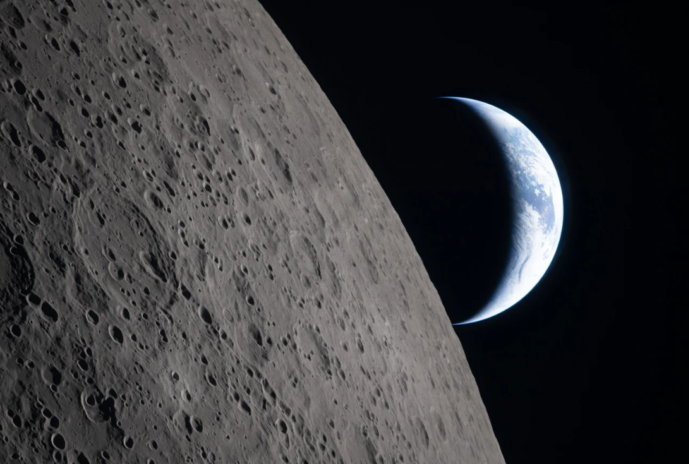
Background
The Artemis II mission saw astronauts fly around the moon in preparation for later missions aimed at landing on the moon. It was the first lunar mission in 50 years and set the record for the furthest distance humans have travelled from Earth.
Generative AI programs can be used to create photo-realistic images, videos, and audio. These programs are trained on a huge number of images and videos, which they use to generate new content. A person using the AI can simply write what they want to see, and the program will produce an image or video based on that description.
Links to Examples
About the Example
In this variation of “Two Truths and a Lie,” two of these images of the moon were captured during the Artemis II mission and one was generated using AI. Students will discover which image is “AI” by using reverse image searches.
To determine which of these images is AI-generated we can use a reverse image search to see where else they have appeared online. By doing so we learn the first two images are authentic photographs taken during the Artemis II mission and were published by NASA as well as many professional news sources, including the CBC and CNN. The third image appears in many social media posts as well as articles by professional fact-checking organizations PolitiFact and Snopes, that identify the image as generated by AI.
Activities
- Show students the three images and tell them that while they have all been attributed to the Artemis II mission around the moon, two are authentic and one is AI-generated.
- Ask students to use a reverse image search to learn more context about each image and determine which is AI-generated. (Students can watch the video Skill: Search the History of an Image to learn several ways to do a reverse image search, including with Google Lens, Google Images, or TinEye.)
- Once students have made their determination, discuss the following guiding questions:
- Which image is AI-generated? How did you come to this conclusion?
- What is the best way to determine if an image is AI-generated or not?
- Why might someone have created this image? Why might others have shared it?
Review and Discuss Key Concepts (optional)
AI slop is low-quality, mass-produced content generated by AI that floods the internet. It’s often designed to grab attention and drive engagement (through likes, shares, or views) so the creator can make money or boost their account’s popularity.
Explain the concept of AI slop to students and ask student to discuss the following question:
- Image 3 was shared by a social media account called @CryptoSays that posts sells courses on Cryptocurrency trading. Why motivation might they have had for sharing this AI-generated image of the moon?
Related Resources
- LESSON: Verification Skills Lesson 4: Trace the Information
- VIDEO: Trace the Information (1:54 minutes)
- VIDEO: Skill: Search the History of an Image (8:32 minutes)